“The disk you attached was not readable”: when it’s a Linux disk
Don't click Initialize: it opens Disk Utility to erase the disk. A disk formatted on Linux – a USB drive, a Steam Deck's microSD card – isn't broken; macOS has no driver for ext4. Choose Ignore. Extent (macOS 27, Apple silicon) mounts ext2, ext3 and ext4 in the Finder, free to read.
Last checked · Extent needs macOS 27 or later on a Mac with Apple silicon.
When macOS shows it
macOS reads APFS, Mac OS Extended, FAT and exFAT, and NTFS for reading. When it can mount nothing at all on a disk – no partition with a file system it knows – it shows this message. One readable partition is enough to keep it quiet.
That is why a Raspberry Pi's SD card doesn't show it: the card's small FAT boot partition mounts, and the ext4 partition beside it, with the system and your files, silently doesn't appear. Opening a Raspberry Pi card on a Mac covers that case.
| Disk | What's on it | Extent |
|---|---|---|
| A USB drive or SSD formatted on Ubuntu, Debian or Raspberry Pi OS | ext4 | Reads it; writes after a one-time purchase |
| An older Linux disk | ext2 or ext3 | Reads it |
| A Steam Deck's microSD card | ext4 with case-insensitive folders (casefold) | Reads it |
| A disk with Fedora on it (desktop editions since Fedora 33) | Btrfs | No – anylinuxfs |
| An encrypted Linux disk | LUKS, often with LVM inside | No – anylinuxfs, or Luksmith for LUKS |
| A disk taken out of a NAS, such as a Synology | Software RAID (mdadm) with LVM, and Btrfs or ext4 inside | No – anylinuxfs, or a Linux computer |
How to tell it's a Linux disk
Choose Ignore, open the Terminal and list the disks:
diskutil list
Find the disk by its size. A Linux disk shows Linux in the TYPE column of its partitions – for example a USB drive formatted on Ubuntu:
/dev/disk4 (external, physical):
   #:                       TYPE NAME                    SIZE       IDENTIFIER
   0:      GUID_partition_scheme                        *64.0 GB    disk4
   1:           Linux Filesystem                         64.0 GB    disk4s1
| TYPE | What it usually holds | Extent |
|---|---|---|
Linux | An ext2, ext3 or ext4 file system (an MBR partition, as on most SD cards and older drives) | Opens it |
Linux Filesystem | ext4 on most distributions; Btrfs or XFS on some (a GPT partition) | Opens ext2, ext3 and ext4 |
Linux LVM, Linux_LVM | An LVM volume group | Can't open it |
Linux_RAID | A member of a software RAID | Can't open it |
A long ID, such as 933AC7E1-2EB4-4F13-B844-0E14E2AEF915 | A Linux partition type diskutil has no name for – this one is a /home partition | Opens ext2, ext3 and ext4 |
The TYPE is what the partition was marked for, not what is in it. Some tools format ext4 inside a partition marked Microsoft Basic Data, and a disk formatted as a whole, without partitions, shows no TYPE at all. Extent looks at the file system itself, and since version 1.0.2 it lists every Linux partition it can't open with what it found there – LVM, LUKS, RAID, Btrfs, XFS – so its window answers the question too.
Opening it on the Mac
Choose Ignore or Eject
Either leaves the files where they are.
Install Extent and turn on its extension, once
Extent is free on the Mac App Store. Switch it on in System Settings › General › Login Items & Extensions › File System Extensions; the banner in Extent's window opens that pane for you.
Disconnect the disk and connect it again
macOS offers a disk to the installed file systems when it is connected. One that was connected before the extension was on isn't offered again until it is reconnected.
Open it in the Finder
An ext2, ext3 or ext4 disk now mounts by itself, read-only, and the message doesn't come back. To change files on ext4, writing is a one-time purchase and a switch per disk – see how to read and write ext4 on a Mac, which also compares the other ways to do it.
If the message comes back with Extent installed
Extent's window says why, in a sentence, for every Linux partition it couldn't open:
- The extension is off. A banner says so, with a button to the switch.
- The disk was connected before the extension was on, or while the Mac was starting up. Eject it and connect it again.
- It holds LVM, LUKS, a software RAID, Btrfs or XFS. Extent names what it found and can't open it; anylinuxfs can, or the Linux computer the disk came from. Which disks Extent opens, device by device.
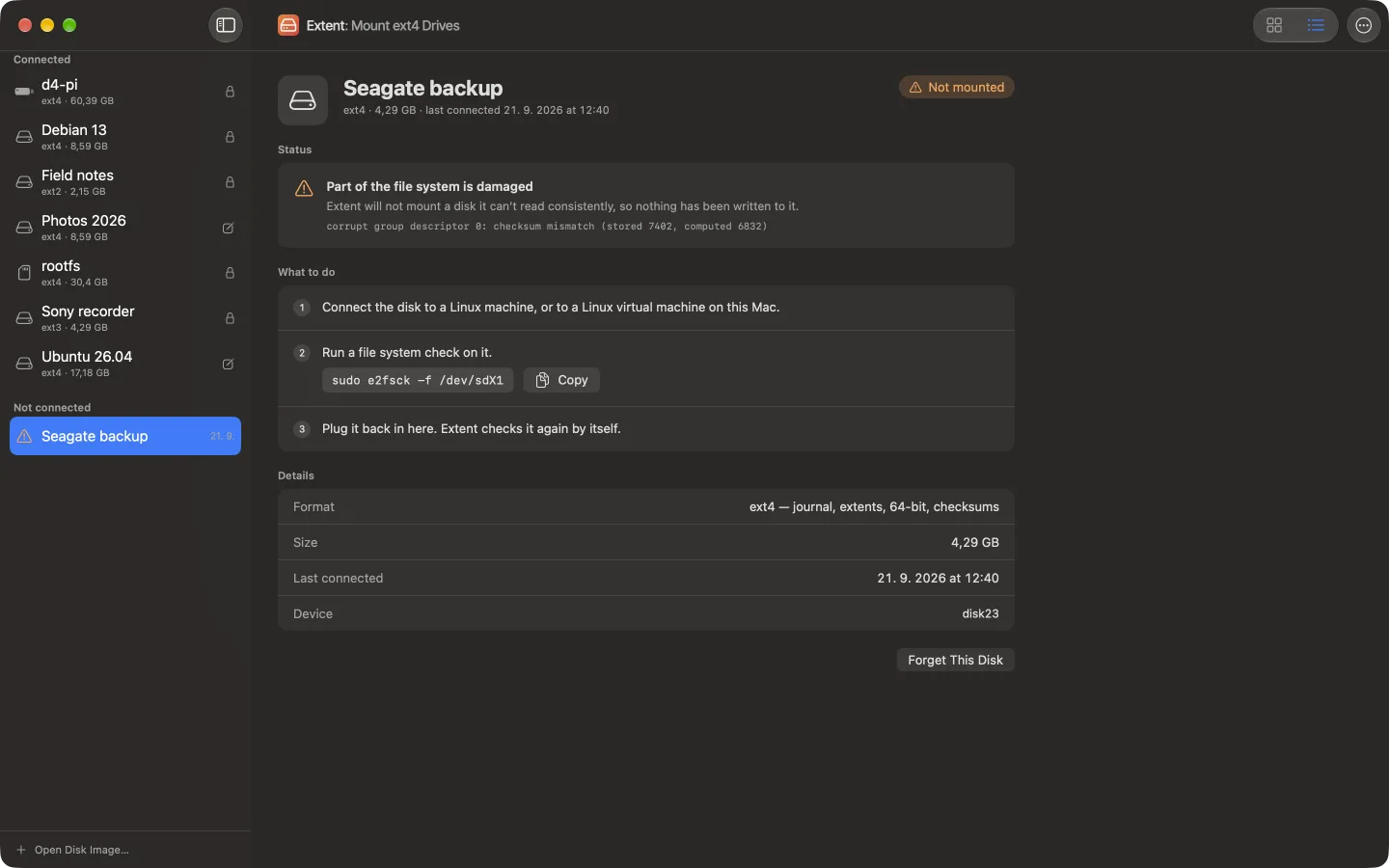
- The ext file system is damaged – a checksum that doesn't match, a file system larger than the disk. Extent leaves it alone and tells you to check it with
e2fsckon Linux. - Another file system driver mounted it – Paragon's, or another ext4 app. Extent names the driver.
When it isn't a Linux disk
If diskutil list shows no Linux partition, Extent can't help, and the cause is elsewhere:
- A new disk that was never formatted. Then Initialize is the right button – or, for a disk meant for Linux, format it as ext4.
- A disk encrypted with BitLocker on Windows, or one a camera, TV or recorder formatted its own way. macOS reads neither.
- A cable, hub or card reader that doesn't pass the disk through properly. Try another port or reader before anything else.
Whatever the disk is, don't erase it while the files on it matter and you don't yet know what is on it.
Frequently asked questions
Does clicking Initialize erase my disk?
Not by itself: it opens Disk Utility. Choosing Erase there formats the disk for the Mac and deletes everything on it. For a disk with files you want, choose Ignore or Eject.
How do I fix “The disk you attached was not readable by this computer” without erasing?
Find out what is on the disk first: diskutil list in the Terminal shows Linux partitions as Linux. A Linux disk isn't broken; it needs a driver. Extent mounts ext2, ext3 and ext4 on macOS 27, free to read; anylinuxfs handles LVM, LUKS, RAID and Btrfs.
Why does my Raspberry Pi's SD card show only the boot partition, with no message?
Because macOS shows the message only when it can mount nothing on a disk. The card's boot partition is FAT, which macOS mounts; the ext4 partition with the system and your files just doesn't appear. Extent mounts it beside the boot partition.
My Steam Deck's microSD card isn't readable on my Mac. What can I do?
Steam Deck formats its microSD cards as ext4 with case-insensitive folders. Extent reads such a card, with names matched exactly as written; it doesn't write to case-insensitive ext4 yet, so the card mounts read-only.
Is the disk damaged?
Not because of this message. It only says macOS has no driver for what is on the disk. A Linux file system can be damaged too – then Extent says so and tells you to check it with e2fsck on Linux – but that is a separate question.
A Linux disk, readable after all.
Extent mounts ext2, ext3 and ext4 in the Finder on macOS 27. Reading is free; writing to ext4 is a one-time purchase.
Sources
Facts on this page were checked against these sources on 2 November 2026.
- Apple: the dialog and its buttons (DiskArbitration, DADialog.m)
- Apple: when a disk counts as unreadable (DiskArbitration, DAPrivate.c)
- UAPI Group: Discoverable Partitions Specification (Linux partition types)
- Fedora: Btrfs by default (Fedora 33)
- Steam Deck FAQ: microSD cards use ext4 with casefolding
- Synology: recovering data from a NAS disk on a PC (mdadm, lvm2)
- anylinuxfs: LUKS, LVM, Linux RAID, Btrfs, ZFS
- Luksmith
- Extent on the Mac App Store