How to read and write ext4 on a Mac (2026)
macOS can't read ext4 by itself. On macOS 27 the cleanest route is an FSKit app: no kernel extension, no lowered security, and the disk appears in the Finder. Extent reads ext2, ext3 and ext4 for free and writes ext4 through its journal for a one-time $3.99 in the US.
Last checked · Extent needs macOS 27 or later on a Mac with Apple silicon.
Why a Mac can't open ext4
ext4 is the file system Linux formats its disks with – Ubuntu, Debian and Raspberry Pi OS among them. macOS reads APFS, Mac OS Extended, FAT and exFAT, and NTFS only for reading; it has no ext4 driver. Plug in a Linux disk and, when nothing on it is readable, macOS says “The disk you attached was not readable by this computer”, with Initialize, Ignore and Eject.
Don't click Initialize. It opens Disk Utility, where erasing the disk would format it for the Mac and delete everything on it. Choose Ignore or Eject; the files are still there. More in what “not readable” means for a Linux disk.
Everything that reads ext4 on a Mac adds a driver of some kind, and there are four kinds. A kernel extension runs inside macOS itself. A FUSE layer such as macFUSE runs the file system in an ordinary program. An FSKit app is a file system extension written against the framework Apple added in macOS 15.4 – the way Apple's own newer file systems run, outside the kernel. And a Linux virtual machine lets Linux read the disk and hands the files to the Mac.
Which kind matters more on macOS 27 than it used to, because macOS 27 runs only on Macs with Apple silicon. On those Macs a third-party kernel extension loads only after you lower the Mac's security policy to Reduced Security in Startup Security Utility, from Recovery. So on macOS 27, every kernel-extension route – Paragon's driver, macFUSE's kernel backend – asks that of every Mac. FSKit apps and virtual machines don't. More in ext4 without macFUSE or a kernel extension.
Every way, side by side
What each option reads and writes, what it does with the ext4 journal, whether it needs Reduced Security, and what it costs – as its maker describes it, with the page each row was checked on.
| Option | Reads | Writes | Journal | Reduced Security | Price | macOS |
|---|---|---|---|---|---|---|
| Extent (FSKit)App Store, 2 Nov 2026 | ext2, ext3, ext4 | ext4 with a journal | Replays an unclean journal; writes through it | No | Free to read; writing $3.99 once | 27 or later, Apple silicon |
| ExtendFS (FSKit)Known limitations, 2 Nov 2026 | ext2, ext3, ext4 | No | Not replayed; such a disk mounts with a warning | No | $14.99; source free on GitHub | 15.6 or later |
| Ext4 Explorer (FSKit)App Store, 2 Nov 2026 | ext4 | ext4, after an in-app purchase | Writes are journaled; replay not stated | No | $2.99 + $3.99 for writing | 26.4 or later |
| TuxKit (FSKit)App Store, 2 Nov 2026 | ext2, ext3, ext4; Btrfs | ext3, ext4 | Replays a pending journal; doesn't mount if it can't | No | Free | 15.6 or later |
| xlinuxfs (FSKit, Linux kernel code)GitHub, 2 Nov 2026 | ext2, ext3, ext4, XFS, Btrfs | The same | As on Linux; read-only mounts skip replay | No | $2.99 | 15.4 or later |
| EXT4 Access (FSKit)App Store, 2 Nov 2026 | ext4 | ext4 | Refuses a disk that needs recovery | No | $4.99 | 15.7 or later; Apple silicon not yet verified by its maker |
| Luksmith (FSKit, Homebrew)luksmith.app, 2 Nov 2026 | ext2, ext3, ext4, also inside LUKS | The same | Replays on mount; writes through the journal | No | Free to read; $9.99 for writing | 26 or later, Apple silicon |
| anylinuxfs (Linux microVM)GitHub, 2 Nov 2026 | ext4, Btrfs, XFS, ZFS, NTFS, exFAT, also inside LUKS, LVM and Linux RAID | The same | Linux's own driver, in the VM | No | Free | Apple silicon; builds for macOS 15 to 27 |
| Omnimount (FUSE-T)omnimount.es, 2 Nov 2026 | ext2, ext3, ext4; NTFS | The same | Not stated | No | €9.99 once; source free | 13 or later, Apple silicon |
| Paragon extFS for Mac (kernel extension)Product page, Reduced Security, 2 Nov 2026 | ext2, ext3, ext4 – by its own list not with metadata_csum, inline_data, bigalloc or meta_bg | The same | Supports has_journal; replay not stated | Yes, on Apple silicon | $39.95 once; 10-day trial | 10.15 to 27 |
| macFUSE + ext4fuse or fuse-ext2macFUSE, fuse-ext2, 2 Nov 2026 | ext4fuse: ext4; fuse-ext2: ext2, ext3, ext4 | ext4fuse: no; fuse-ext2: yes, though its README warns against it for data you can't lose | Not stated | Yes with the kernel backend; the FSKit backend is experimental | Free | 12 or later |
| Linux in a virtual machine (UTM)UTM docs, 2 Nov 2026 | Anything Linux reads | Anything Linux writes | Linux's own | No | UTM free; Parallels from $99.99 a year | USB passthrough with QEMU; with Apple's backend from 27 |
Every row was checked on its maker's own page on 2 November 2026. Apps change: if a row is out of date, tell us at apps@xfanta.com and we'll correct it.
Which one fits
- You want the files off a Linux disk, once. Any FSKit app that reads it will do. Extent and TuxKit read for free, with no time limit.
- You write to an ext4 USB drive or a Raspberry Pi card regularly. An FSKit app that writes through the journal, so a cable pulled mid-write leaves the disk consistent rather than half-changed.
- The disk is inside LVM, LUKS encryption or software RAID, or it's Btrfs, XFS or ZFS. anylinuxfs runs a small Linux and handles all of those. Luksmith unlocks LUKS; xlinuxfs reads and writes XFS and Btrfs. Which disks open with Extent, and which don't.
- You need Linux's own tools –
e2fsck,mkfs.ext4,resize2fs. A Linux virtual machine, or the Linux machine the disk came from – though e2fsprogs runs on a Mac too: formatting a drive as ext4 on a Mac. - A guide tells you to install ext4fuse. It only ever read ext4, its last change was in September 2020, and Homebrew marks its formula as Linux-only and deprecated as unmaintained. Guides that still recommend it predate everything else in the table.
Reading and writing ext4 with Extent
Extent is our own FSKit file system for ext2, ext3 and ext4. It needs macOS 27 or later on a Mac with Apple silicon.
Install Extent and open it
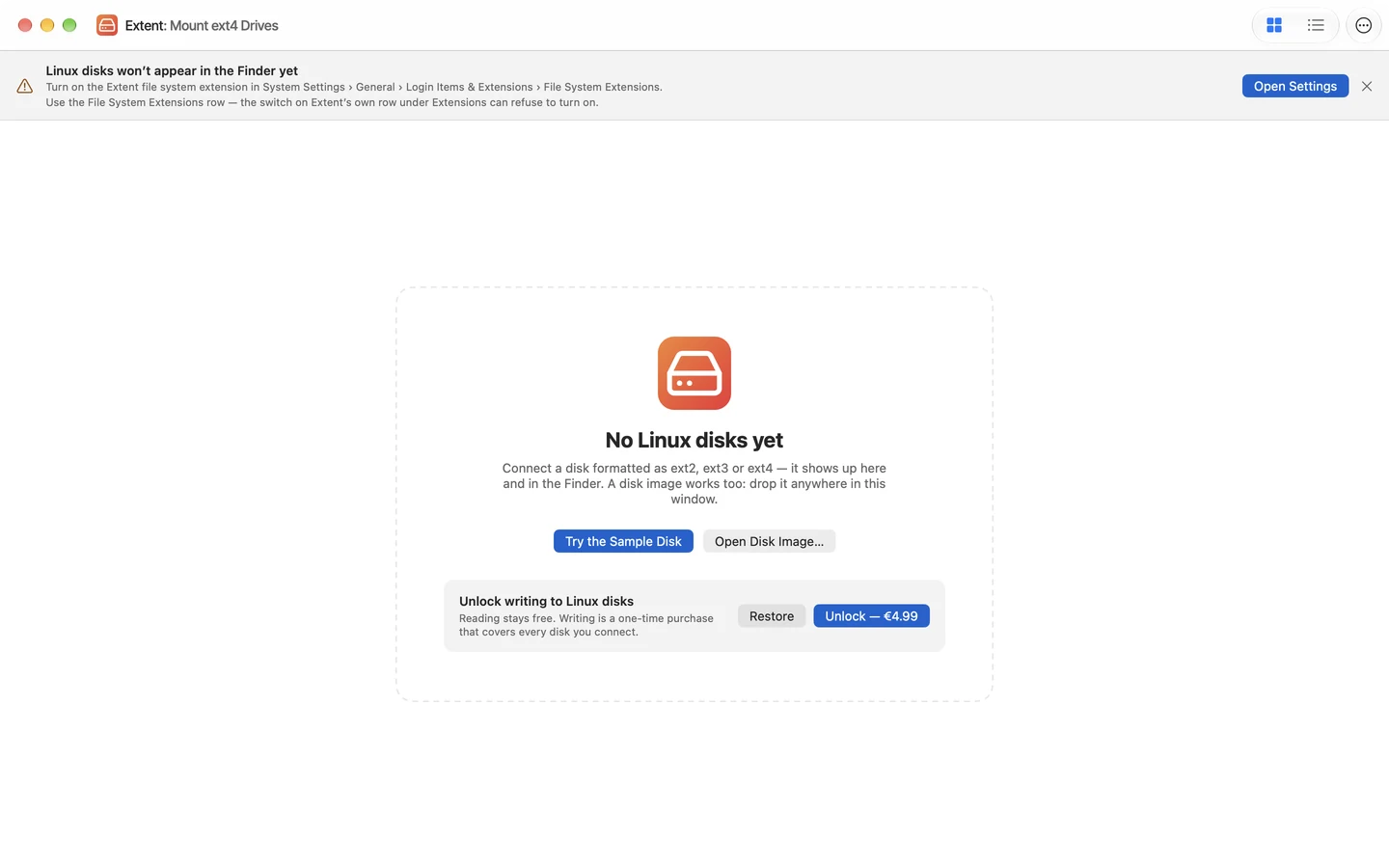
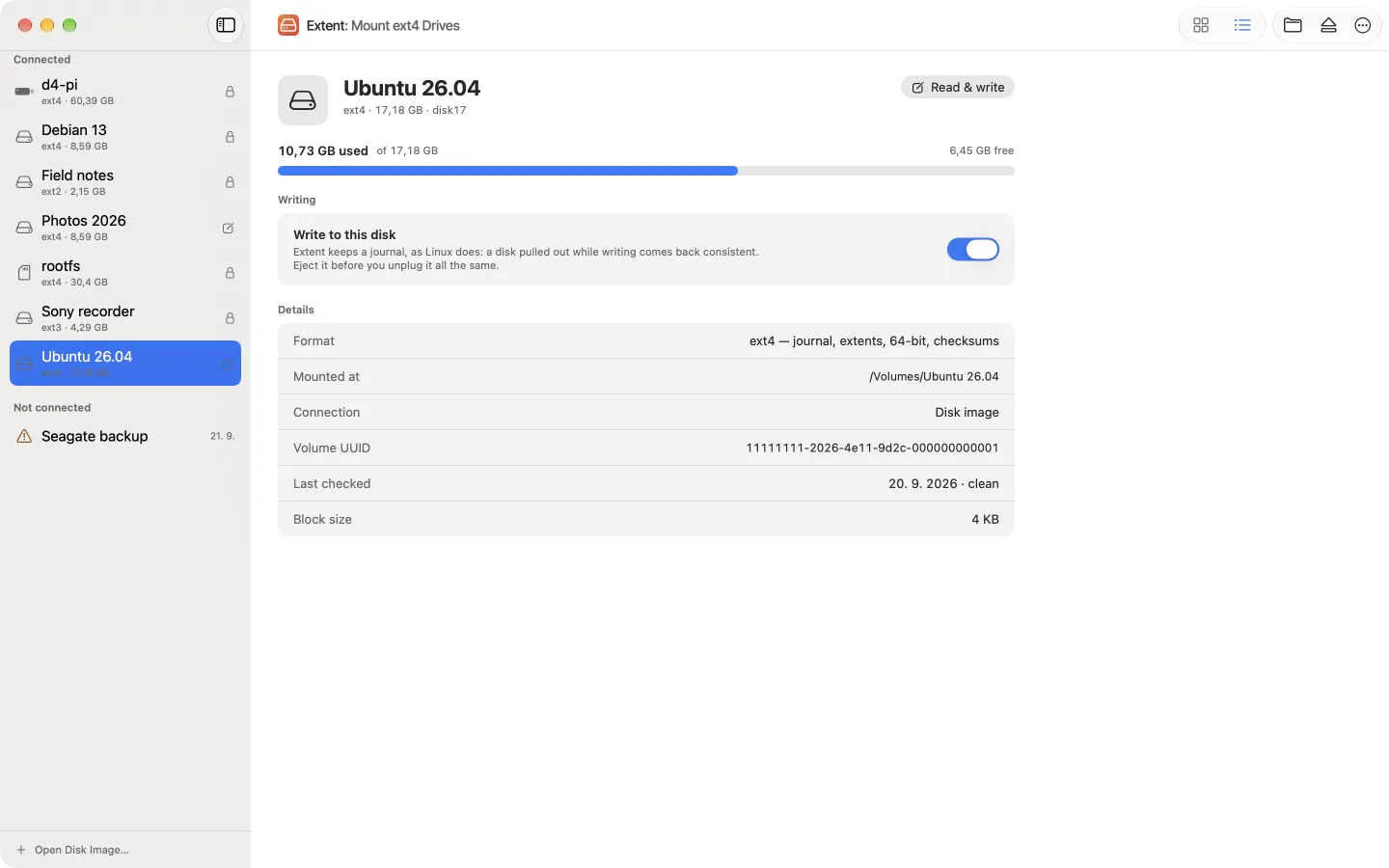
It's free on the Mac App Store. Its window lists the Linux disks connected now and the ones it has seen before.
Turn on its file system extension, once
System Settings › General › Login Items & Extensions › File System Extensions, and switch Extent on. The banner in Extent's window has a button that opens that pane. Use the File System Extensions row: on macOS 27, the switch under Extent's own row in the Extensions list can refuse to turn on.
Plug in the disk
It mounts by itself, read-only, in the Finder and in every app, with the files where Linux left them. A disk image works too: File › Open Disk Image…, or drop the
.imgon the window.To write, unlock writing and turn it on for that disk
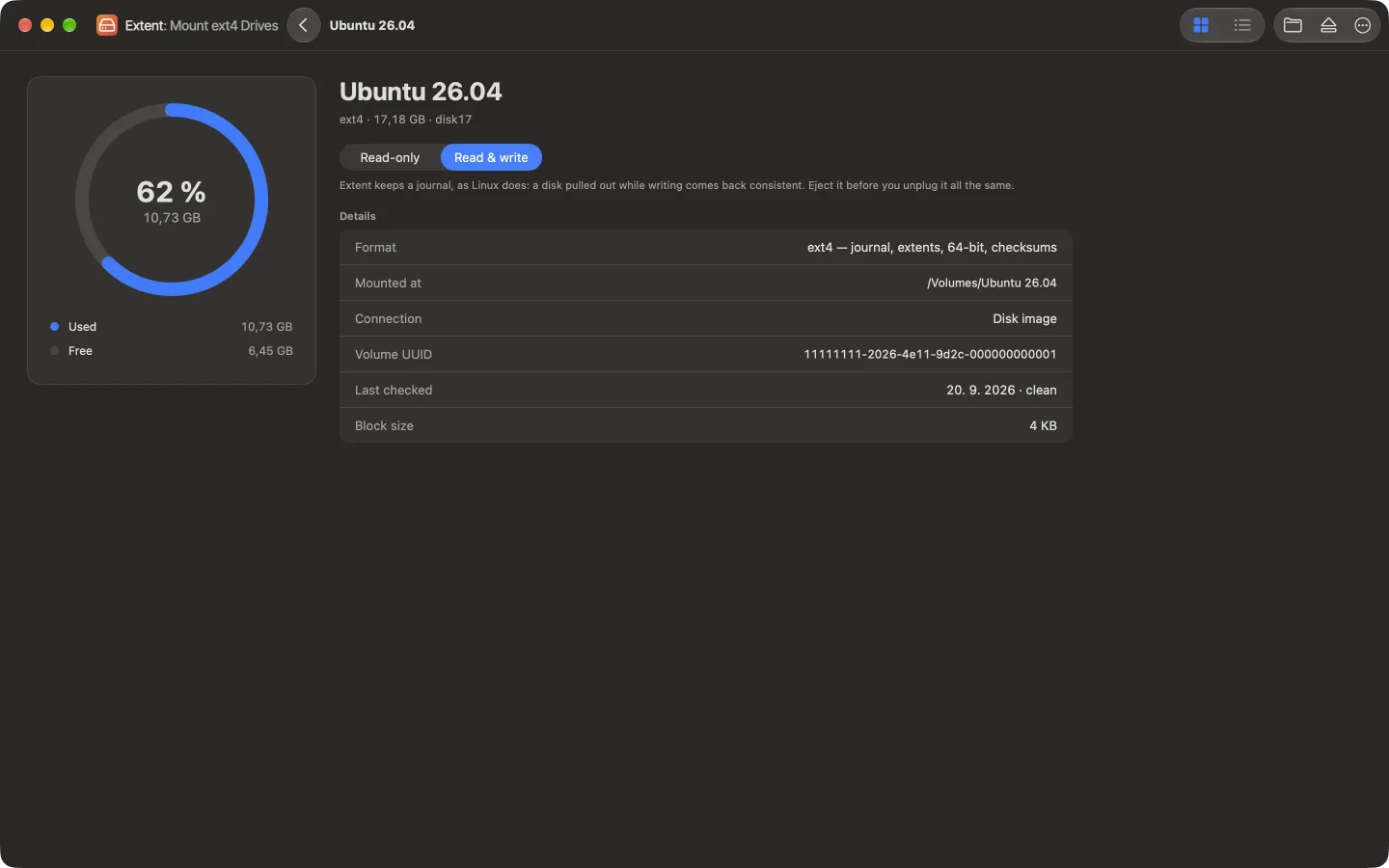
Writing is a one-time purchase under Extent › Unlock Writing…. Then turn on “Write to this disk” in the disk's details, eject the disk and connect it again: a file system is mounted either read-only or read-write.
Eject before you unplug
In the Finder or in Extent's window, as with any disk. If the cable does come out mid-write, the journal brings the disk back consistent the next time it's connected.
If the disk doesn't appear, or stays read-only
- It isn't in the Finder or in Extent's window. The usual reason: the disk was connected before the extension was on, or while the Mac was starting up, and macOS doesn't offer it to Extent again. Eject it and connect it once more. Since version 1.0.2 Extent lists every Linux partition it can't open, with the reason.
- It's inside LVM, LUKS or software RAID, or it's Btrfs or XFS. Extent says so and can't open it; see “Which one fits” above and which disks Extent opens.
- Another ext4 driver took it. With Paragon's kernel extension or another FSKit app installed, macOS may hand the disk to that driver first. Extent's window names the driver that mounted the partition.
- Writing is on, and the disk still mounts read-only. Extent says why in a sentence: an ext2 or ext3 disk, ext4 without a journal, a feature it can't write yet – such as the case-insensitive folders of a Steam Deck's microSD card – damage Linux recorded, which wants
e2fsck -fon Linux first, or an SD card's lock switch.
What Extent doesn't do
- It doesn't format or repair disks. Create ext4 with
mkfs.ext4– which runs on a Mac too – and repair it withe2fsckon Linux; when a disk needs a check, Extent gives you the command to copy. - It doesn't open LVM, LUKS, software RAID, Btrfs, XFS or ZFS – anylinuxfs does.
- It writes only ext4 with a journal and extents, which is how Linux formats ext4 unless told otherwise. ext2, ext3 and ext4 with features it can't write yet stay read-only.
- It doesn't run on Intel Macs or before macOS 27: it is built on the FSKit API that macOS 27 introduced.
Frequently asked questions
Can a Mac read ext4 without extra software?
No. macOS has no ext4 driver, and for a Linux disk it offers Initialize…, which leads to erasing it in Disk Utility. Choose Ignore, then add one of the drivers compared above.
Is there a free way to read ext4 on a Mac?
Yes. Extent reads ext2, ext3 and ext4 for free with no time limit, and TuxKit is free. anylinuxfs is free and open source, run from the Terminal on Apple silicon. ExtendFS's source is free on GitHub. ext4fuse is free too, but unmaintained since 2020 and read-only.
Do I have to lower my Mac's security to use ext4?
Only with a kernel extension. On a Mac with Apple silicon, Paragon extFS and macFUSE's kernel backend need Reduced Security set in Recovery. FSKit apps such as Extent run outside the kernel and need nothing of the kind – only a switch in System Settings.
Is it safe to write to an ext4 disk from a Mac?
It is as safe as the driver's handling of the journal. Extent writes the way Linux does: changes gather into a transaction, the transaction commits to the journal, and only then does the disk itself change, so a disk pulled out mid-write comes back consistent. What Extent writes passes e2fsck -fn, and Linux reads it back exactly. Eject before unplugging all the same.
Does Extent work on an Intel Mac or on macOS 26?
No: it needs macOS 27, which runs only on Apple silicon. On older macOS, ExtendFS (from 15.6, read-only), TuxKit (15.6) and xlinuxfs (15.4, also on Intel) are FSKit apps that do.
Linux disks on the Mac, read and written.
Extent mounts ext2, ext3 and ext4 in the Finder on macOS 27. Reading is free; writing to ext4 is a one-time purchase.
Sources
Facts on this page were checked against these pages on 2 November 2026.
- Apple: FSKit
- Apple Platform Security: kernel extensions and Reduced Security on Apple silicon
- Apple: macOS 27 is compatible with Macs with Apple silicon
- Extent on the Mac App Store
- ExtendFS: known limitations
- ExtendFS on the Mac App Store
- Ext4 Explorer on the Mac App Store
- TuxKit on the Mac App Store
- xlinuxfs on the Mac App Store
- xlinuxfs: platform support
- EXT4 Access on the Mac App Store
- Luksmith
- anylinuxfs
- Omnimount
- Paragon extFS for Mac
- Paragon extFS for Mac: product overview (price, trial)
- Paragon: Reduced Security on Apple silicon
- macFUSE
- macFUSE 5.0.0: FSKit backend
- ext4fuse
- Homebrew: ext4fuse
- fuse-ext2
- UTM: USB sharing
- Parallels Desktop: buy